POSTذكاء اصطناعيAI
AI Agents: إيه هي وبتشتغل إزاي من جوهAI agents: what they are and how they work inside
الفرق بين شات بوت بيرد ووكيل بينفذ، الحلقة اللي كل الوكلاء ماشيين عليها، وإمتى تستخدمهم وإمتى لأ.The difference between a chatbot that answers and an agent that acts, the loop every agent runs on, and when to use one.
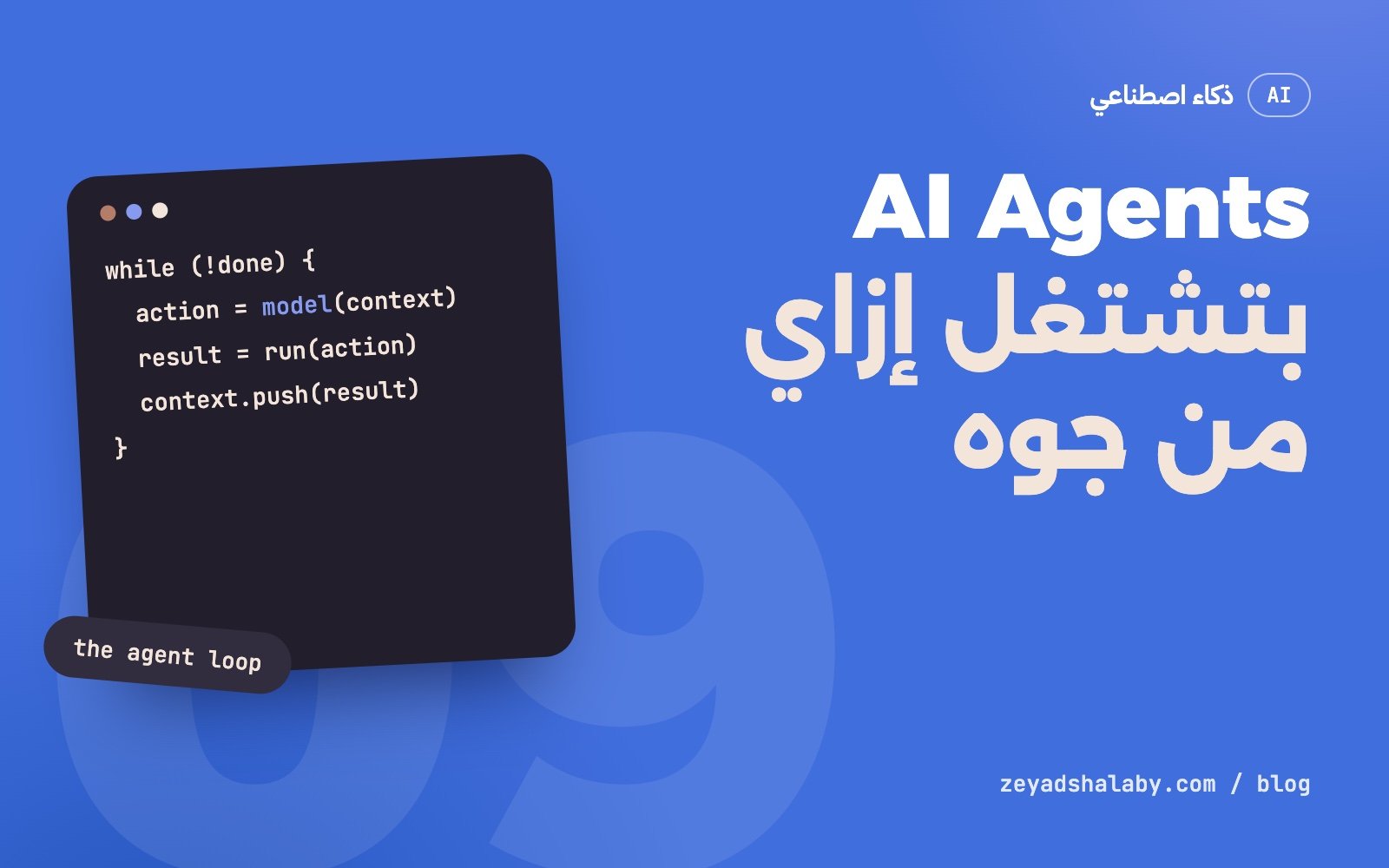
AI Agents أو وكلاء الذكاء الاصطناعي هي برامج بتحط نموذج لغوي جوه حلقة: النموذج يقرر خطوة، البرنامج ينفذها بأداة حقيقية، النتيجة ترجع للنموذج، ويقرر الخطوة اللي بعدها، لحد ما المهمة تخلص. الشات بوت بيرد عليك بكلام. الوكيل بينفذ: يقرا ملفات، يشغل أوامر، يفتح صفحات، يبعت طلبات. الفرق ده هو اللي مخلي الموضوع قوي، وهو نفسه اللي مخليه محتاج حذر.
الفرق بين شات بوت ووكيل
اسأل شات بوت “إيه سبب الخطأ ده في مشروعي؟” هيرد من اللي انت لصقته وبس. لو المعلومة الناقصة في ملف تاني، هيخمن.
اسأل وكيل نفس السؤال: هيفتح الملف، يدور على الدالة اللي بتتنادى، يقرا الملف التاني، يشغل الاختبارات عشان يشوف الخطأ بعينه، يعدل، ويشغلها تاني عشان يتأكد. محدش قاله الخطوات دي. هو قررها واحدة واحدة حسب اللي لقاه.
- الشات بوت: سؤال، إجابة. انت اللي بتنفذ.
- الـ workflow: خطوات ثابتة مكتوبة مقدما، والنموذج بيملا خانة في كل خطوة.
- الوكيل: هدف، والنموذج هو اللي بيقرر الخطوات وعددها وترتيبها.
الحلقة اللي كل الوكلاء ماشيين عليها
مهما كان اسم المنتج، الجوه واحد:
context = [التعليمات, طلب المستخدم]

while (true) {
  reply = model(context, tools)      // النموذج يقرا كل اللي فات

  if (reply.is_final_answer) break   // خلص، يرد على المستخدم

  result = run_tool(reply.tool_call) // البرنامج ينفذ الأداة فعلا
  context.push(reply, result)        // النتيجة تدخل في السياق
}
نقطتين مهمين هنا:
- النموذج مش بينفذ حاجة بنفسه. هو بيكتب “عايز أنادي الأداة دي بالمدخلات دي”، والبرنامج اللي حواليه هو اللي بينفذ ويرجعله النتيجة.
- النموذج مالوش ذاكرة بين اللفات. كل لفة بيقرا السياق كله من الأول. اللي مش في السياق مش موجود بالنسباله.
الأدوات: إيدين الوكيل
الأداة هي دالة عادية معاها وصف بلغة بشرية وشكل المدخلات. مثلا:
{
  "name": "read_file",
  "description": "يقرا محتوى ملف نصي من المشروع",
  "input_schema": {
    "type": "object",
    "properties": { "path": { "type": "string" } },
    "required": ["path"]
  }
}
النموذج بيقرا الوصف ده ويقرر إمتى يستخدمها. عشان كده جودة الوصف بتفرق زي جودة الكود: وصف مبهم معناه أداة بتتنادى غلط أو مش بتتنادى خالص.
ولو عايز نفس الأداة تشتغل مع أكتر من تطبيق من غير ما تعيد كتابتها، ده اللي بيعمله بروتوكول MCP. شرحه في MCP: إيه هو وليه كل الأدوات بتدعمه.
السياق والذاكرة
كل نموذج ليه “نافذة سياق”: أقصى كمية نص يقدر يشوفها في المرة. في مهمة طويلة النافذة دي بتتملي بنتايج الأدوات. الوكلاء بيتعاملوا مع ده بكذا طريقة:
- التلخيص: لما السياق يكبر، الجزء القديم يتلخص ويتشال.
- ملفات الملاحظات: الوكيل يكتب اللي اتعلمه في ملف، ويقراه في أول كل جلسة جديدة. ده اللي بيتسمى ذاكرة.
- وكلاء فرعيين: مهمة بحث كبيرة تتبعت لوكيل تاني بسياق نضيف، ويرجع بالخلاصة بس.
- البحث عند الحاجة: بدل ما يتحط كل حاجة في السياق، الوكيل يدور ويجيب الجزء اللي محتاجه. نفس فكرة RAG.
من هنا تفهم ليه الوكيل ساعات “بينسى” حاجة قلتهاله من ساعة: هي ممكن تكون خرجت من السياق أو اتلخصت.
إمتى الوكيل يفيدك
الوكيل بيلمع لما المهمة:
- خطواتها مش معروفة مقدما. تتبع خطأ، بحث في كود مش بتاعك، مقارنة مصادر.
- ليها طريقة تتأكد بيها. اختبارات بتعدي أو لأ، صفحة بتفتح أو لأ. الوكيل اللي يقدر يشوف نتيجة شغله بيصلح نفسه.
- غلطها يتصلح. تعديل في فرع Git تقدر ترجع عنه، مش إيميل اتبعت لعميل.
وما تستخدموش لما:
- الخطوات ثابتة ومعروفة. سكربت عادي أرخص وأسرع ونتيجته متوقعة.
- مفيش طريقة تتأكد من النتيجة غير إنك تعيد الشغل بنفسك.
- الغلطة الواحدة تمنها عالي ومفيش مراجعة بشرية في النص.
ادي الوكيل هدف وطريقة يتأكد بيها، مش قايمة خطوات.
المخاطر اللي لازم تعرفها
- حقن التعليمات: الوكيل بيقرا صفحات وملفات، وأي حد يقدر يكتب فيها كلام موجه له. التفاصيل في Prompt Injection: الثغرة اللي لازم تفهمها.
- الأفعال اللي ما بترجعش: حذف، إرسال، دفع، نشر. دي لازم تستنى موافقتك.
- الصلاحيات الواسعة: وكيل معاه مفتاح بيعمل كل حاجة هو خطأ مستني يحصل. اديله أقل صلاحية تكفي المهمة.
- الثقة الزايدة في التقرير: الوكيل ممكن يقول “خلصت وكله تمام” والاختبارات واقعة. شوف الدليل، مش الملخص.
- التكلفة: كل لفة في الحلقة بتقرا السياق كله تاني. مهمة طويلة ممكن تستهلك كتير.
أبدأ منين
- جرب وكيل جاهز. أدوات البرمجة اللي بتشتغل على مشروعك هي أسهل مدخل، لأن الكود ليه اختبارات و Git. شوف Claude Code للمبتدئين.
- ابدأ بمهام تتراجع بسهولة: كتابة اختبارات، شرح كود قديم، تعديل صغير في فرع لوحده.
- اتعلم تكتب الطلب. الوكيل بيضخم جودة طلبك في الاتجاهين. راجع كتابة Prompt للكود.
- بعد كده ابني واحد صغير. حلقة وأداتين بـ 50 سطر هتفهمك أكتر من أي مقال.
AI agents are programs that put a language model inside a loop: the model decides a step, the program carries it out with a real tool, the result goes back to the model, and it decides the next step, until the task is done. A chatbot replies with words. An agent acts: reads files, runs commands, opens pages, sends requests. That difference is what makes them powerful, and also what makes them need care.
Chatbot versus agent
Ask a chatbot “what causes this error in my project?” and it answers from what you pasted. If the missing piece is in another file, it guesses.
Ask an agent the same question: it opens the file, finds the called function, reads the other file, runs the tests to see the error itself, edits, and runs them again to confirm. Nobody listed those steps. It chose them one by one based on what it found.
- Chatbot: question, answer. You do the work.
- Workflow: fixed steps written in advance, with the model filling a slot in each.
- Agent: a goal, and the model decides the steps, their number and order.
The loop every agent runs on
Whatever the product is called, the inside is the same:
context = [instructions, user request]

while (true) {
  reply = model(context, tools)      // the model reads everything so far

  if (reply.is_final_answer) break   // done, answer the user

  result = run_tool(reply.tool_call) // the program really runs the tool
  context.push(reply, result)        // the result enters the context
}
Two points matter here:
- The model executes nothing itself. It writes “I want to call this tool with these inputs”, and the surrounding program runs it and returns the result.
- The model has no memory between turns. Each turn it reads the whole context again. What is not in the context does not exist for it.
Tools: the agent’s hands
A tool is an ordinary function with a human-language description and an input shape. For example:
{
  "name": "read_file",
  "description": "Reads the content of a text file in the project",
  "input_schema": {
    "type": "object",
    "properties": { "path": { "type": "string" } },
    "required": ["path"]
  }
}
The model reads that description and decides when to use it. So the quality of the description matters as much as the code: a vague description means a tool called wrongly or not at all.
If you want the same tool to work across several apps without rewriting it, that is what the MCP protocol does. See MCP: what it is and why every tool supports it.
Context and memory
Every model has a “context window”: the most text it can see at once. In a long task that window fills with tool results. Agents handle this in several ways:
- Summarising: when the context grows, the old part is summarised and dropped.
- Notes files: the agent writes what it learned to a file and reads it at the start of each new session. This is what gets called memory.
- Sub-agents: a large search is sent to another agent with a clean context, which returns only the conclusion.
- Retrieval on demand: instead of loading everything, the agent searches and pulls the part it needs. The same idea as RAG.
This explains why an agent sometimes “forgets” something you said an hour ago: it may have left the context or been summarised.
When an agent helps
An agent shines when the task:
- Has steps you cannot know in advance. Tracing a bug, exploring code that is not yours, comparing sources.
- Has a way to check itself. Tests pass or fail, a page loads or does not. An agent that can see the result of its work corrects itself.
- Has reversible mistakes. An edit on a Git branch you can undo, not an email sent to a client.
Do not use one when:
- The steps are fixed and known. A plain script is cheaper, faster and predictable.
- There is no way to verify the result except redoing the work yourself.
- A single mistake is costly and no human reviews in between.
Give an agent a goal and a way to check it, not a list of steps.
Risks you need to know
- Prompt injection: the agent reads pages and files, and anyone can write text addressed to it there. Details in Prompt injection: the flaw you need to understand.
- Irreversible actions: deleting, sending, paying, publishing. These must wait for your approval.
- Broad permissions: an agent holding a key that does everything is a mistake waiting to happen. Give the least that covers the task.
- Trusting the report too much: an agent may say “done, all good” while tests fail. Look at the evidence, not the summary.
- Cost: every turn of the loop reads the whole context again. A long task can consume a lot.
Where to start
- Try a ready-made agent. Coding tools that work on your project are the easiest entry, because code has tests and Git. See Claude Code for beginners.
- Start with tasks that are easy to review: writing tests, explaining old code, a small change on its own branch.
- Learn to write the request. An agent amplifies the quality of your request in both directions. See writing prompts for code.
- Then build a small one. A loop and two tools in 50 lines will teach you more than any article.
التعليقاتComments
اقرا كمانRead next
 ذكاء اصطناعيAI
5 دقايق قرايةmin read
Claude Code للمبتدئين: إزاي تشتغل بوكيل برمجة من غير ما تبوظ مشروعكClaude Code for beginners: working with a coding agent without wrecking your project
ذكاء اصطناعيAI
5 دقايق قرايةmin read
Claude Code للمبتدئين: إزاي تشتغل بوكيل برمجة من غير ما تبوظ مشروعكClaude Code for beginners: working with a coding agent without wrecking your project
 ذكاء اصطناعيAI
5 دقايق قرايةmin read
Prompt Injection: الثغرة اللي لازم تفهمها قبل ما تبني بالذكاء الاصطناعيPrompt injection: the flaw to understand before building with AI
ذكاء اصطناعيAI
5 دقايق قرايةmin read
Prompt Injection: الثغرة اللي لازم تفهمها قبل ما تبني بالذكاء الاصطناعيPrompt injection: the flaw to understand before building with AI
سيب تعليقLeave a comment